
The Traveler's Phone Wallpaper - Greece
Your Essential Guide to Communicating in Greece—Right in Your Pocket!
$4.99$1.99
🇬🇷 The Traveler's Phone Wallpaper – Greece
Your Essential Guide to Communicating in Greece—Right in Your Pocket!
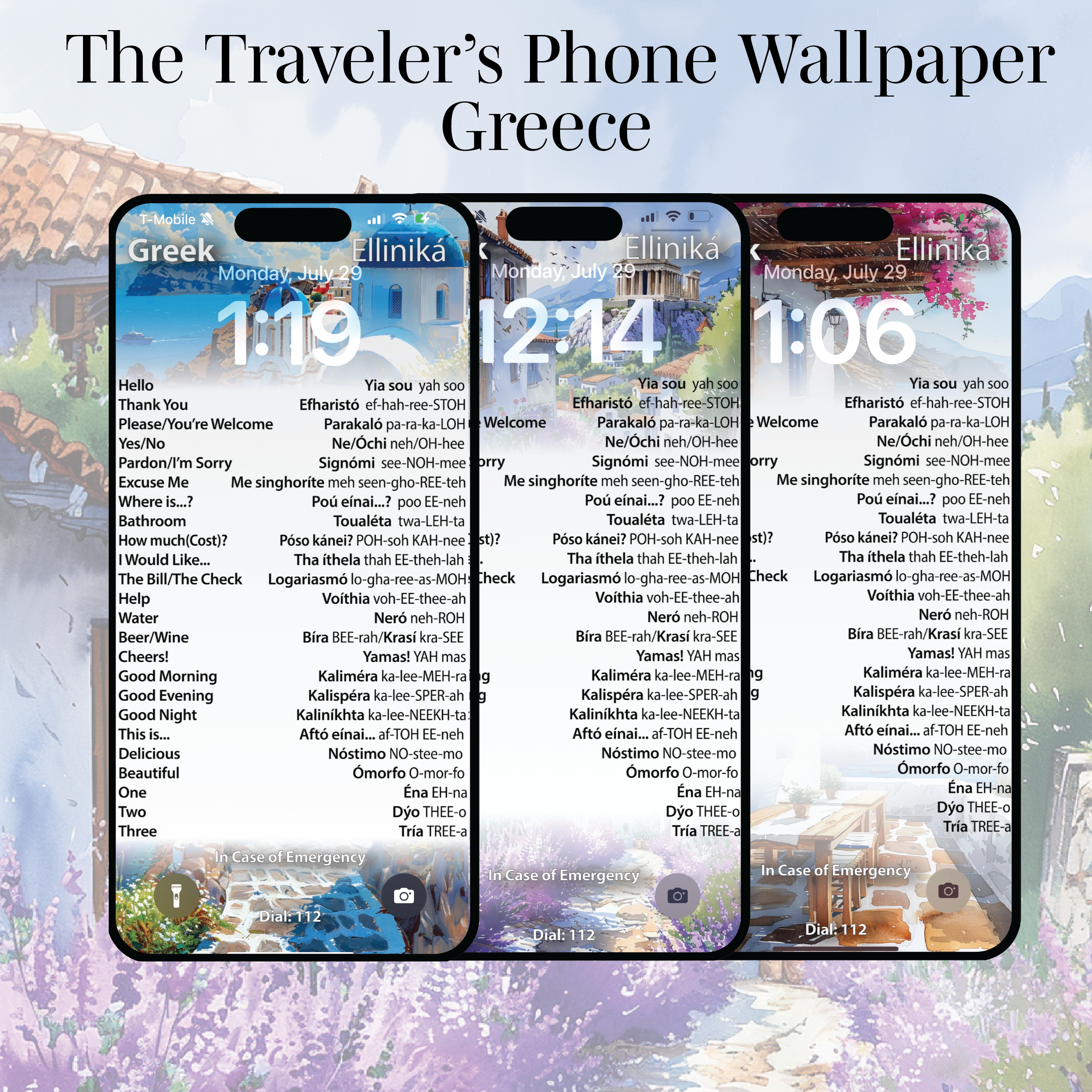
Unlock the secrets of Greece with this handy phone wallpaper featuring 25 must-know words and phrases tailored for travelers!
Whether you're shopping, dining, or sightseeing, connect with locals by embracing their language and immerse yourself in the local culture.
Why You'll Love It:
✅ INSTANT ACCESS – With The Traveler's Phone Wallpaper, just pull out your phone and have your language guide easily available—no need to swipe or type into a translator.
✅ Having this language guide so easily accessible makes it simple to quickly remember important words and phrases while traveling.
✅ Keeping it on your Lock Screen ensures repetition—you’ll constantly see the words and remember them in no time.
✅ With English on the left, Greek on the right, and pronunciation included, you'll be able to thank that local shop owner or waiter in their language!
📸 Beautiful & Functional:
Available in 5 stylish designs inspired by Athens, Mykonos, and Santorini
Combines travel aesthetic with practical use
Designed to avoid interference with time/date and Lock Screen icons
📱 Compatible Devices:
iPhones:
X, XS, 11, 11 Pro, 12, 12 Pro, 13, 13 Pro, 14, 14 Pro, 15, 15 Pro
Samsung Galaxy:
S22, S22+, S22 Ultra
More sizes coming soon!
🛠 Custom Sizes Available:
Don’t see your phone model?
We’ll resize your wallpaper within 48 hours—just message us or email SoundTracksTravelBlog@gmail.com after purchase.
📥 How It Works:
Purchase & receive your download link
Choose the file for your phone model
Save to your photo library
Set it as your Lock Screen
You're ready to travel smarter!
📲 iPhone Users – Quick Tip:
If the wallpaper appears blurred:
Open the image
Take a screenshot (Side Button + Volume Up)
Set the screenshot as your wallpaper
This bypasses Apple’s automatic blur feature.
💡 Also, enable Stacked Notifications:
Settings → Notifications → Stack – for a cleaner view.